How to Compress a PDF Without Losing Quality (Complete Guide)
How to Compress a PDF: Introduction
How to compress a PDF without losing quality is one of the most common questions asked by students, professionals, and office users.
PDF (Portable Document Format) is one of the most widely used file formats for sharing documents. Whether you’re submitting a job application, sending business reports, sharing study materials, or uploading documents to government portals, PDFs preserve formatting across devices and operating systems.
However, PDF files can sometimes become very large, making them difficult to upload, email, or store. Many websites impose file size limits, often requiring PDFs to be under 1 MB or 2 MB. Fortunately, you can reduce the file size without making the document unreadable by using the right compression techniques.
This guide answers the question of how to compress a PDF, why PDF files become large, and how to reduce their size while maintaining good document quality.
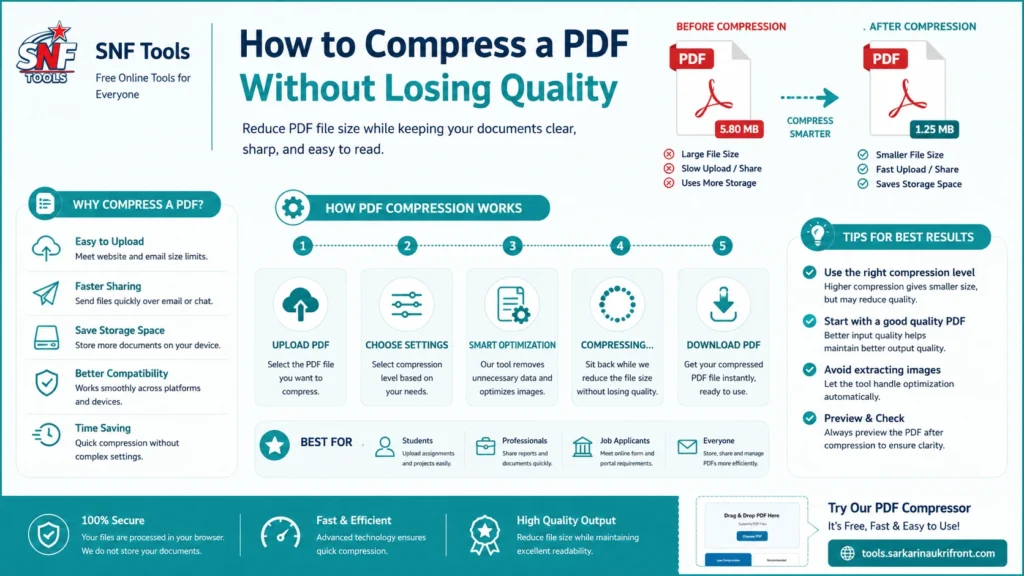
Table of Contents
Why PDF Files Become Large
Several factors contribute to large PDF file sizes:
- High-resolution scanned pages
- Large embedded images
- Multiple photographs inside the document
- Repeated fonts and graphic resources
- Unnecessary metadata
- Embedded objects and attachments
A scanned document containing many color images can be significantly larger than a text-based PDF created directly from a word processor.
How PDF Compression Works
PDF compression reduces the amount of storage required without changing the document’s purpose. Depending on the content, different techniques may be used:
Image Compression
Images inside the PDF are compressed using efficient image formats and optimized quality settings to reduce file size while maintaining readability.
Resolution Optimization
Very high-resolution images are often unnecessary for screen viewing. Reducing image resolution can significantly decrease the overall PDF size without noticeably affecting visual quality.
Resource Optimization
Duplicate resources, unused objects, and unnecessary metadata may be removed to make the document more efficient.
Selective Compression
Modern PDF compressors analyze each page individually. Pages containing mostly text may be preserved differently from pages containing large images to achieve a better balance between quality and file size.
Tips to Reduce PDF Size Without Losing Quality
- Start with the highest-quality original PDF available.
- Avoid repeatedly compressing the same document.
- Use moderate compression for text-heavy files.
- Choose stronger compression only for scanned image documents when necessary.
- Review the compressed PDF before sharing it to ensure text remains clear and readable.
When Should You Compress a PDF?
Compressing a PDF is particularly useful when:
- Uploading documents to online application portals.
- Sending files through email.
- Sharing documents via messaging apps.
- Saving storage space.
- Speeding up file transfers.
- Meeting maximum upload size limits.
Benefits of PDF Compression
Using an optimized PDF offers several advantages:
- Faster uploads
- Faster downloads
- Reduced storage requirements
- Easier sharing
- Better compatibility with online submission systems
- Improved user experience on slower internet connections
Protecting Document Quality
The goal of PDF compression is not simply to make the file as small as possible. Excessive compression can blur text, reduce image clarity, and make documents difficult to read.
A well-designed PDF compressor balances file size reduction with document quality, ensuring that the compressed file remains suitable for viewing, printing, and online submission.
Use our PDF Compressor tool to compress PDF files online.
Conclusion
Knowing how to compress a PDF effectively can make documents easier to upload, store, and share without sacrificing readability. By understanding how PDF files are structured and choosing appropriate compression settings, you can significantly reduce file size while preserving the quality of your documents. Whether you’re submitting government application forms, sharing business reports, or sending educational materials, learning how to compress a PDF ensures your files meet upload requirements while remaining clear and professional. If you frequently work with PDFs, using a reliable browser-based PDF compression tool can save time, simplify document management, and help you optimize your documents with ease.
PDF specifications are maintained by the Adobe PDF documentation.
You may optimize your documents by using our online tools like: